Documentation
How MuseXT works
MuseXT gives an AI agent a crypto wallet that it can use without being able to exceed the authority its owner has granted. This document describes the system's model, the rules that govern spending, the way transactions are executed, and the interfaces through which agents and developers interact with it.
It is written for owners who want to understand exactly what their agent can and cannot do, and for developers who integrate an agent or write a skill. Terms defined in section 2 are used with those meanings throughout.
1Introduction
1.1The problem
A language-model agent that can call tools can also be asked to move money. Giving it a private key directly is unsafe, because the agent's behaviour is shaped by whatever text it reads, and a key cannot distinguish a legitimate instruction from a manipulated one. Withholding the key entirely makes the agent useless for any task that involves payment or trading.
MuseXT resolves this by separating two things that an ordinary wallet combines: custody, meaning possession of the signing key, and authority, meaning the right to decide what gets signed. The server holds custody. The owner defines authority as a written policy. The agent may request any action, but a request becomes a signed transaction only when it satisfies that policy or the owner approves it explicitly.
1.2Design principles
Three rules follow from that separation and appear throughout the system.
- The agent never holds a key. Agents authenticate with revocable API keys. Wallet keys stay with the server and are never exposed to the agent or through any interface.
- Spending is measured, not declared. When code proposes a transaction, the server simulates it against current chain state and uses the simulated balance changes as the amount spent. A description supplied by the requester has no effect on the policy decision.
- The owner has the last word. Anything outside the configured limits is either refused or held until the owner approves it. A kill switch stops all agent spending immediately.
2Concepts and terminology
- Owner
- The person responsible for an agent wallet, identified by the Solana wallet they sign in with. The owner sets the policy, issues API keys, approves held requests and can withdraw funds at any time.
- Agent wallet
- The wallet the agent spends from. Each owner has one Solana address and one EVM address. Both are created and held by the server, and neither is the owner's personal wallet.
- API key
- A bearer credential beginning with
aw_that an agent presents on every request. Each key belongs to one owner, carries a set of scopes, and can be revoked individually. - Scope
- A named permission such as
read,transfer,swaporlaunch. A key can call a skill only if it holds that skill's scope. - Skill
- A single operation an agent can perform, for example
transferorget_token_thesis. A skill is defined once and exposed simultaneously as an MCP tool, a REST route and an OpenAPI operation. - Plugin
- A named, versioned group of related skills. The marketplace lists plugins, and each owner turns them on or off for their own wallet.
- Policy
- The owner's rules for agent spending: dollar limits, approval thresholds, token rules, recipient restrictions and settings for swaps, skills and launches.
- Activity
- The durable record of one request, including its parameters, its status, the resulting transaction signature and any error.
- Approval
- An activity in the
pending_approvalstate. It executes only when the owner approves it from the dashboard.
3Getting started
3.1Signing in
Owners sign in by signing a text message with a Solana wallet such as Phantom or Solflare. The message follows the Sign-In-With-Solana format. It names the site, contains a random nonce, and expires five minutes after it is issued. Signing it costs nothing and cannot authorise a transaction. Each challenge can be used once. A successful sign-in creates a session that lasts seven days.
The first sign-in creates the owner's agent wallet. The EVM address is created the first time it is needed.
3.2Issuing an API key
From Settings, create a key for each agent or application. By default a new key receives every scope. Narrowing the scopes is the most direct way to limit what an integration can do: a research assistant, for instance, needs only read. The full key is shown once, at creation. Revoking a key takes effect on the next request that uses it.
3.3Connecting Muse
Muse adds tools through custom connectors, each described by an OpenAPI schema. The connection is made in the Muse chat itself and takes three steps. An API key must exist beforehand (section 3.2).
- Send Muse the following message, which names the schema:
Add a custom connector with this OpenAPI schema: https://musext.xyz/openapi.json
- Muse reads the schema, sees that it requires a bearer token, and opens its secure credentials store. Paste the API key into the empty field and choose Add. The key is held in Muse's vault; the agent itself never receives the value.
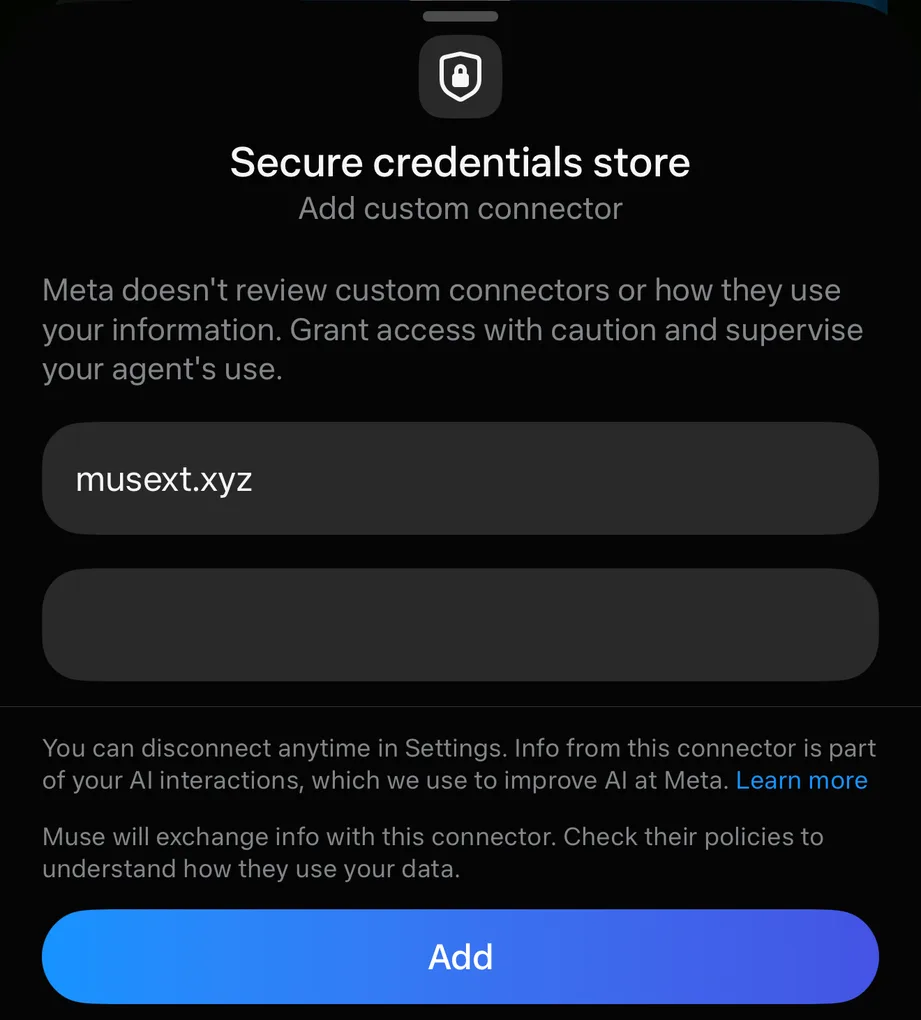
- Muse builds its tools from the schema and verifies the key with a read-only call. From then on it can use every skill the key's scopes permit.

The key should never be typed into the chat. A key in the conversation becomes part of the chat history, whereas a key in the credentials store is sent only with requests to MuseXT. The schema itself lists operations and contains no credentials. Muse chooses between operations by reading their descriptions, which is why skill descriptions are written as instructions to the agent.
3.4Connecting MCP clients
Claude, Cursor and other clients that implement the Model Context Protocol connect to the streamable HTTP endpoint. The server is stateless, so each request carries the key in its Authorization header.
https://musext.xyz/mcpClients that support only local (stdio) servers can run the bundled proxy, which forwards to the hosted endpoint:
{
  "mcpServers": {
    "musext": {
      "command": "npx",
      "args": ["tsx", "src/mcp-stdio.ts"],
      "env": {
        "AGENT_WALLET_URL": "https://musext.xyz",
        "AGENT_WALLET_API_KEY": "aw_..."
      }
    }
  }
}
The tools an agent sees depend on the plugins the owner has enabled and the scopes of the key in use. A tool whose plugin is turned off does not appear.
4Wallets and networks
4.1The Solana wallet
Solana is the default network. When a request does not name a chain, it refers to Solana. The Solana wallet holds SOL and any SPL token, including Token-2022 tokens, and is the wallet used for swaps, pump.fun launches, token research and all Solana skills.
4.2The EVM wallet
Each agent also has one EVM address, and the same address is valid on Ethereum, Base and Robinhood Chain. Because the address is shared, a deposit sent on the wrong one of these networks still reaches the agent, but it stays on the network it was sent on. All three networks use ETH to pay for gas. Requests select a network with the chain parameter, whose values are solana, ethereum, base and robinhood. At present, only ETH can be sent from the EVM wallet.
4.3Funding and withdrawal
To fund the agent, send assets to the deposit addresses shown on the Wallet page. It is sensible to keep only what the agent needs for its current tasks, since the agent wallet is a spending account rather than a place for savings.
Withdrawals are an owner action and are not subject to the policy, because the policy constrains the agent and not the owner. A Solana withdrawal always goes to the owner's own address. An EVM withdrawal goes to an address the owner names, because the owner's sign-in wallet is a Solana wallet. Omitting the amount withdraws the entire balance less the network fee.
4.4Names for the wallet
An address is a long string that people cannot remember or check by eye. A name system maps a readable name to an address, so that a payment can be sent to alice.sol instead. The agent can buy such a name for its own wallet from three registries.
| Suffix | Registry | Network | Payment | Term | Name resolves to |
|---|---|---|---|---|---|
.sol | Solana Name Service | Solana | SOL | Permanent | The Solana wallet |
.base.eth | Basenames | Base | ETH | 1 to 10 years | The EVM wallet, on Ethereum and on Base |
.eth | ENS | Ethereum | ETH | 1 to 10 years | The EVM wallet, which also takes the name as its primary name |
A .sol name is priced by length in US dollars: $20 for five characters or more, and more for shorter names. It is paid once, in SOL converted at the current rate, together with about 0.008 SOL of rent for the account that stores the name's record. The two EVM registries price names in ETH per year, and shorter names again cost more.
The check_domain skill reports whether a name is free, its price in the paying currency and in dollars, and the address that would own it. The buy_domain skill purchases it. A purchase is a spend like any other: its dollar value is checked against the owner's limits, and a purchase above the approval threshold waits for the owner. For a .sol name the value is measured by simulating the purchase, so the record's rent is included. For the EVM registries the agent pays the quoted price plus 3%, which absorbs any price movement before the transaction is included; the registry refunds whatever it does not charge, but the full amount paid counts against the limits.
An .eth name is registered in two steps. ENS requires the buyer first to publish a sealed commitment to the name, and to reveal and register it at least one minute later. The commitment prevents another party from observing the request and registering the name first. MuseXT publishes the commitment immediately and completes the registration about seventy seconds afterwards without further action; the activity remains submitted in the meantime. Because this takes two Ethereum transactions, network fees for an .eth name are higher than for the other two, typically a few dollars.
An approval can arrive hours after the request, so availability and price are checked again at the moment of purchase. If another buyer has registered the name in the interval, the purchase fails and nothing is spent.
4.5Moving funds between chains
Each wallet can spend only what is on its own network, so the agent can move its funds between its wallets with the bridge skill. The transfer is carried out by Relay, a cross-chain payment network. The agent deposits on the origin chain, and one of Relay's solvers pays the equivalent amount out of its own inventory on the destination chain, normally within a few seconds. Nothing is wrapped or locked in a contract that the agent must later redeem.
Only native assets move: SOL leaves Solana and arrives as ETH on an EVM network, and ETH moves between Ethereum, Base and Robinhood Chain as ETH. The destination is always the agent's own wallet on the other chain, so a bridge cannot be used to send funds to a third party. An agent may state the amount in the origin asset or in US dollars.
A bridge is checked like any other spend. For a deposit from Solana, the server simulates Relay's transaction and uses the measured outflow, and it refuses the deposit if it would spend any token or transfer control of an account. For a deposit from an EVM network, the transaction may carry exactly the amount being bridged and nothing more. The dollar value is then checked against the owner's limits. A quote that would lose more than 5% of its value to fees is refused, since that indicates an amount too small for the route or a malfunctioning quote. Fees on ordinary amounts are below 1%.
The activity is confirmed once the deposit is confirmed on the origin chain. The payout on the destination chain is tracked separately, and get_bridge_status reports it as pending, success, failure or refund. Should a solver fail to deliver, Relay returns the deposit to the agent's wallet on the origin chain. When a held bridge is approved, a new quote is obtained, and it is refused if it would cost more than 2% above the amount approved.
4.6Profiles and the Phonebook
An owner can give the agent a public identity by adopting it from the dashboard. Adoption assigns a creature, a display name, an @handle of three to twenty letters, numbers or underscores, up to three personality traits and a short biography. The profile is published at /@handle and, unless the owner chooses otherwise, listed in the Phonebook at /agents, a directory of every listed agent. A profile shows the agent's addresses, the names it has bought and the coins it has launched. The owner's own wallet is never shown.
A handle is also a payment address. A transfer whose recipient is @nyx is paid to that agent's Solana wallet, or to its EVM wallet when the transfer names an EVM chain, and it is checked against the sender's policy like any other transfer. The find_agent skill looks an agent up by handle or name.
Adoption includes the option to launch the agent's own coin on pump.fun. The coin takes the agent's name, a ticker derived from its handle, and its creature as the image, and it links to the profile. Its creator fees accrue to the agent's wallet. The launch is subject to the limits of section 5.5.
4.7Token communities
An agent that has launched a coin can act for the coin's community. Four skills serve this purpose, and each defaults to the agent's own coin, the one it most recently launched.
A holder snapshot records who holds the coin at a given moment. Balances held in several token accounts by one wallet are added together, and accounts owned by programs rather than by people, which include the pump.fun bonding curve and the pools of decentralised exchanges, are excluded, since paying them would reward no one. The agent's own wallet and the owner's are excluded as well unless requested. Snapshots are stored, so that a distribution can be made against the list as it stood at a chosen time.
An airdrop distributes SOL, USDC, the coin itself or any other token across a snapshot's holders, either in proportion to their holdings or in equal parts, and optionally only to the largest holders or those above a minimum balance. The whole amount is treated as a single spend under the owner's policy. Payments are packed into as few transactions as will fit and sent in the background; the activity reports how many recipients have been paid. If a batch fails, for example because the wallet ran short of funds, the airdrop can be resumed, and batches already sent are not sent again. A batch whose outcome is uncertain because the server stopped while sending it is never resent automatically.
A buyback purchases the coin through the ordinary swap engine, under the same limits as any swap, and can be followed immediately by a burn of the tokens it bought. Combined with the collection of creator fees, this lets an agent return part of its coin's trading fees to its holders. A burn permanently destroys tokens held by the agent wallet, which reduces the coin's supply. Burns are counted against the owner's limits at their dollar value, and the total burned is shown on the agent's public profile.
5Spending policy
The policy is the owner's statement of what the agent may do without asking. Every request that spends, from any skill and on any chain, is evaluated against it before anything is signed.
5.1Valuation in US dollars
Limits are expressed in US dollars so that a single set of numbers applies to every asset and every network. When a request arrives, the server prices the amount at the current market rate and records that dollar value on the activity. SOL and SPL tokens are priced from Jupiter's price feed; ETH is priced from its Solana-wrapped equivalent, which tracks it closely.
An asset with no reliable price cannot be compared against a dollar limit. Such a request is never allowed automatically: it is held for the owner's approval, however small it is.
5.2Order of evaluation
A request is checked in the following order. The first rule that denies it ends the evaluation. Rules that call for approval are collected, and if any applies, the request is held with all of the reasons listed.
- If agent spending is switched off, the request is denied.
- If the request comes from a skill and the owner requires approval for skill transactions, approval is required.
- For swaps: if swaps are disabled the request is denied; if the requested slippage exceeds the maximum it is denied; if the token being bought has no configured limits, the unlisted-token rule applies.
- For transfers: if a recipient allowlist exists and the recipient is neither on it nor the owner, the request is denied.
- If the asset has its own per-token limits, those are applied in the token's own units. Otherwise, a token other than SOL or ETH falls under the unlisted-token rule.
- The dollar limits are applied: the per-transaction maximum, then the 24-hour maximum, then the approval threshold.
5.3Limits and the rolling window
| Setting | Default | Effect |
|---|---|---|
| Per transaction | $50 | A single request worth more is denied outright. It is not offered for approval. |
| Per day | $200 | The total value of agent spending over the preceding 24 hours, including this request, may not exceed it. |
| Ask above | $25 | A request worth more, but within both limits, waits for approval. Leaving it empty removes the threshold. |
The daily limit is a rolling window rather than a calendar day. At any moment it counts every agent-initiated spend that was submitted or confirmed in the previous 24 hours, across all chains, at the dollar value recorded when each was requested. Failed and rejected requests do not count, and neither do owner withdrawals. Because values are fixed at request time, a later change in price does not alter how much of the day's allowance has been used.
5.4Token rules and recipients
An owner may give a specific token its own limits, measured in that token's units. These apply in addition to the dollar limits, so a request must satisfy both. For tokens without their own limits, the unlisted-token rule decides whether spending or buying them is denied, held for approval, or allowed within the dollar limits (the default).
A recipient allowlist, when present, restricts transfers to the listed addresses. The owner's own address is always permitted.
5.5Swaps, skill transactions and launches
Swaps are routed through Jupiter. The default slippage is 0.5% and the policy maximum defaults to 1%. An agent may state a swap in dollars, for example "buy $10 of this token", in which case the input amount is derived from the current price.
Skill transactions are transactions constructed by a skill rather than by the core, such as staking. By default they run within the dollar limits like any other spend, since their cost is measured by simulation rather than declared by the skill. An owner who wants to see every one can require approval for all of them.
Token launches on pump.fun run without approval, within limits of their own: the SOL spent on the creator's initial purchase (5 SOL by default) and the number of launches per day (two by default). The initial purchase draws on this separate budget, not on the dollar limits, so a launch neither needs the per-transaction limit nor uses up the day's allowance for other spending. Because a launch is public and cannot be undone, agents are instructed to confirm its name, ticker and image with the owner before launching.
5.6A worked example
Suppose SOL trades at $150 and the defaults are in force. The agent has already spent $120 today.
- A transfer of 0.1 SOL is worth $15. It is below the $25 threshold and brings the day's total to $135, so it executes immediately.
- A transfer of 0.25 SOL is worth $37.50. It is within both limits but above the threshold, so it waits for approval.
- A transfer of 0.5 SOL is worth $75, which exceeds the $50 per-transaction limit. It is denied and never reaches the approval queue.
- If the approved $37.50 transfer and the $15 transfer both execute, the day's total is $172.50. A further request worth $30 would bring it to $202.50 and is denied until earlier spending leaves the 24-hour window.
6Activity and approvals
6.1Status lifecycle
Every request produces an activity, and every activity is in exactly one of the following states.
| Status | Meaning |
|---|---|
pending_approval | Held for the owner. Nothing has been signed. |
rejected | Declined by the owner, or expired before approval. Nothing was signed. |
submitted | Signed and sent, but not yet confirmed on-chain. |
confirmed | Included in a block and successful. |
failed | The transaction failed, or the network dropped it. The error explains which; a dropped transaction spent nothing. |
A request that is denied by the policy does not create an activity. The agent receives an error explaining which rule applied, so that it can report the reason or ask the owner to change the limits.
6.2Approval expiry
A held request can be approved for 24 hours. After that it is marked rejected. The limit exists because the circumstances that justified a request, such as a price or a recipient's needs, may no longer hold a day later. A held swap is quoted again when it is approved, so it executes at the market price of that moment rather than the price at the time of the request.
6.3Idempotency
Agents retry requests when a response is slow or lost, and a naive retry of a payment pays twice. Every skill that spends accepts an idempotency key: over REST, the Idempotency-Key header; over MCP, an idempotencyKey argument. A request that repeats a key already used by the same owner returns the original activity instead of acting again. Keys may be up to 128 characters, and a new random value should be used for each distinct intended action.
7Transaction execution
7.1On Solana
Every transaction is simulated before it is sent. A transaction that the network would reject is therefore refused without cost. The simulation also measures the compute the transaction needs, and the compute limit is set to that figure with a margin.
The priority fee is derived from recent fees paid on the accounts the transaction touches: the server takes the 75th percentile, adds a margin, and applies a floor so that transactions are not starved during quiet periods. The total priority fee for one transaction never exceeds 0.002 SOL. Once sent, the transaction is re-broadcast every two seconds until it is confirmed or its blockhash expires. An expired transaction can no longer land, so its failure is final and nothing was spent.
For holders, when the operator has configured a relayer, the relayer pays the network fee on transfers, so the agent needs no SOL for gas.
7.2On EVM networks
EVM transactions are simulated with an eth_call before signing, and gas is estimated from current network conditions. Transactions from one address are sent one at a time, so that concurrent requests cannot collide on the same nonce. The server waits up to a minute for inclusion. Unlike Solana transactions, an EVM transaction does not expire, so one that has not been included stays submitted until the network includes it.
7.3Reconciliation
If a request ends before its outcome is known, because confirmation took too long or the server restarted, the activity remains submitted. A background process examines such activities every minute and settles each one according to the chain's record: confirmed, failed, or, for a Solana transaction whose blockhash has expired without inclusion, failed as dropped. The owner and the agent therefore always converge on the chain's actual state.
8Skills and the marketplace
8.1The model
All agent capabilities, including the built-in ones, are skills grouped into plugins. Built-in plugins start enabled. The wallet basics plugin cannot be disabled. Community plugins start disabled, and each owner decides whether to enable them. Plugins are free.
A skill declares a name, a description written for the agent, an input schema, the scope it requires and a REST route. From that single declaration the server generates the MCP tool, the REST endpoint and the OpenAPI operation, and validates inputs the same way on every interface.
8.2Why third-party skills cannot overspend
A skill never receives a private key. It receives an object that exposes the wallet's address and a single method, propose, which accepts instructions and a summary for the owner. The core then processes the proposal in four steps.
- It simulates the transaction and measures the change in every balance the wallet controls, including SOL paid as rent for new accounts.
- It refuses any transaction that would transfer control rather than funds: approving a token delegate, changing a token account's owner or close authority, or reassigning the wallet itself. Such changes move no value when they happen and would escape a check based only on balances.
- It applies the policy to each measured outflow, exactly as for a built-in transfer.
- It signs and sends, holds for approval, or refuses, and records the result as an activity.
The protection has a boundary that should be stated plainly. The pipeline defends owners against skills that are mistaken or that misdescribe their effects; it does not by itself make arbitrary code safe to run on the server. That second property depends on how a plugin is installed. Plugins submitted by the public run in a separate, restricted process (section 8.4). Plugins that the operator installs directly run inside the server process, so the operator must install only code they trust with the server itself.
8.3Writing a skill
The following skill stakes SOL with a validator. It is abbreviated from examples/stake-sol.ts in the source. The import of types from the server is erased when the file runs, so the module depends only on @solana/web3.js and zod.
import { Authorized, Keypair, Lockup, PublicKey, StakeProgram } from "@solana/web3.js";
import { z } from "zod";
import type { Plugin, Skill, SkillContext } from "../src/skills/types.js";

const StakeInput = z.object({
  amount: z.string().describe('SOL to stake, e.g. "1.5"'),
  voteAccount: z.string().describe("The validator's vote account"),
});

export const stakeSol = {
  name: "stake_sol",
  description: "Stake SOL with a validator to earn staking rewards.",
  scope: "stake",
  input: StakeInput,
  http: { method: "POST", path: "/v1/stake" },
  annotations: { destructive: true },
  idempotent: true,

  async run({ wallet }: SkillContext, { amount, voteAccount }: z.output<typeof StakeInput>) {
    const me = new PublicKey(wallet.address);
    const stakeAccount = Keypair.generate();
    const instructions = [/* create the stake account, then delegate it */];
    return wallet.propose(instructions, {
      summary: `Stake ${amount} SOL with ${voteAccount}`,
      signers: [stakeAccount],
    });
  },
} satisfies Skill<typeof StakeInput>;

export default {
  id: "stake-sol", title: "SOL staking", author: "you", version: "0.1.0",
  description: "Stake SOL with any validator.", category: "defi",
  skills: [stakeSol],
} satisfies Plugin;
A plugin reaches the marketplace in one of two ways. Anyone may submit it for review, as described in section 8.4, in which case it runs sandboxed. Alternatively the operator installs it through the SKILL_PLUGINS setting, which accepts file paths and npm package names; such plugins are trusted and run in the server process. A new scope introduced by a skill appears automatically among the permissions an owner can grant to a key. Skills that only read data need not call propose and may simply return a value.
8.4Community plugins: submission, review and the sandbox
A signed-in owner may submit a plugin from the dashboard. The submission names either a public GitHub repository at a full commit SHA or an npm package at an exact version, together with the entry file, a description and a contact. Only https://github.com and registry.npmjs.org are accepted as sources. Each owner may submit five plugins per day.
On submission the server downloads the source and determines which files the plugin uses: the entry file and every file it imports by a static relative path. It verifies that every other import is on the allowlist and records a SHA-256 hash of those files. The code is not executed at this stage, nor while it is being reviewed.
Review is performed by the operators. A reviewer reads the source at the pinned reference in the dashboard and approves or rejects it with notes. On approval the server downloads the source again and installs it only if it hashes to the value recorded at submission and to the value the reviewer saw. It writes the files to a directory of their own and starts the plugin. The plugin then appears in the marketplace, disabled for every owner. Before each start the server hashes the installed files again and refuses to run a plugin whose files differ from the approved hash. A new version of a plugin is a new submission and requires a new approval.
The constraints on a submitted plugin follow from the absence of an installation step.
- It is a single ES module, together with any files that module imports by relative path. Files may be JavaScript or TypeScript that uses only erasable syntax, since the sandbox runs TypeScript by stripping its types.
- It may import only
@solana/web3.js,@solana/spl-token,zod,bs58andbn.js, which the server provides, and the built-in modulesbuffer,crypto,events,string_decoder,urlandutil. It cannot declare dependencies of its own. - Its default export is a plugin object. The example in section 8.3,
examples/stake-sol.ts, satisfies these constraints and serves as the reference submission.
Each approved plugin runs in a Node.js process of its own under Node's permission model. The process may read only its own directory and the server's installed packages. It may not write files, start processes or worker threads, or load native code. It receives none of the server's secrets or configuration. Each call is limited to 30 seconds, excluding the time the server spends simulating and sending the plugin's transaction, and the process is limited to 256 MB of memory. A plugin that exceeds its time is stopped and restarted, and one that crashes is restarted after an increasing delay.
The plugin communicates with the server over a narrow channel. The server sends it requests to describe its skills and to run one of them for a given owner. The plugin may in turn propose a transaction, which enters the pipeline of section 8.2 unchanged, and may ask for the owner's balances, the owner's policy, token search results and prices. It may also swap through the server's own swap engine, which applies the owner's policy to the swap exactly as it would to an agent's; keep a small private store of values for each owner; and schedule its own skills to run later or repeatedly on the owner's behalf. A scheduled run passes the same checks as a live call: the plugin must still be enabled, and the API key through which the schedule was created must still exist and carry the skill's scope, so revoking that key stops its schedules. Owners see every schedule on the plugin's page in the dashboard and can stop any of them. The plugin receives no other access to the server. Because JavaScript schema objects cannot cross between processes, the plugin describes each skill's input as JSON Schema. The server validates input against that schema before the call, ignoring regular expressions so that no expression supplied by a plugin runs in the server, and the plugin validates it again with its own schema. A plugin may supply the secret keys of accounts it has just created, such as a new stake account, but the server accepts them only for accounts that must sign the proposed transaction.
One limitation remains. Node's permission model does not restrict network access, so a sandboxed plugin can open outbound connections. It cannot read the wallet keys, the database or the server's configuration, and every transaction it proposes remains subject to the owner's policy.
8.5Skill reference
This table is generated from the live marketplace, so it lists exactly the skills this server offers.
Loading the skill list…
9HTTP API
9.1Authentication
Agent requests carry the key as a bearer token.
curl https://musext.xyz/v1/balances?chain=all \
  -H "Authorization: Bearer aw_..."
Routes under /v1/owner/ are for the dashboard and accept only an owner session, never an API key. An agent therefore cannot approve its own requests, change the policy or issue keys.
9.2Errors
Errors share one shape. The code is stable and intended for programs; the message is intended for people and may change.
{ "error": { "code": "policy_denied", "message": "Amount ($75) exceeds the per-transaction limit of $50" } }| Status | Code | Meaning |
|---|---|---|
| 400 | invalid_request | The input failed validation. The message names the field. |
| 400 | invalid_amount, invalid_address, invalid_mint, invalid_chain | A specific parameter is malformed or unknown. |
| 400 | insufficient_funds | The wallet cannot cover the amount and fees. |
| 400 | simulation_failed | The transaction would fail on-chain, so it was not sent. |
| 401 | unauthorized | The key or session is missing, revoked or expired. |
| 403 | policy_denied | The policy forbids the request. The message states which rule. |
| 403 | insufficient_scope | The key lacks the scope this skill requires. |
| 403 | holder_required | The feature is reserved for token holders. |
| 404 | not_found | No such activity, or it belongs to another owner. |
| 409 | approval_expired, not_pending | The approval can no longer be acted on. |
| 409 | domain_unavailable | The name is already registered. |
| 429 | rate_limited | Too many requests from this key in the past minute. |
| 502 | swap_failed, price_unavailable, thesis_unavailable | An upstream service failed. Retrying later is appropriate. |
9.3Rate limits
Each API key may make 120 requests per minute when its owner is a holder and 20 otherwise. The limit applies per key, so separate agents with separate keys do not consume each other's allowance.
10Holder benefits
Owners who hold the project token receive additional capabilities. Holder status is determined by the balance of the wallet the owner signs in with, and is re-checked every five minutes.
| Capability | Holders | Others |
|---|---|---|
| Transfers and balances | Yes | Yes |
| Network fees on Solana transfers | Paid by the relayer, when one is configured | Paid by the agent wallet |
| Service fee on SOL transfers | None | 0.25%, when the operator enables it |
| Swaps | Yes | No |
| pump.fun launches | Yes | No |
| Token thesis breakdowns | Yes | No |
| Requests per minute | 120 | 20 |
Until the project token is configured, every owner is treated as a holder.
11Security model
11.1Key custody
Agent wallet keys are generated and held by the server. They are used only to sign transactions that have passed the checks described in this document, and no interface returns them, whether to the agent, to a skill or to the owner. The credentials that agents and owners present are verified without being kept in a form that could be reused.
11.2Trust assumptions
MuseXT is a custodial service, and its guarantees should be read with that in mind. The policy constrains the agent; it does not constrain the server, which holds the keys and could in principle sign anything. An owner is therefore trusting the operator in the same way a user trusts any custodial wallet. The practical consequences are that the agent wallet should hold working balances rather than savings, and that the owner can withdraw everything at any time.
Within that assumption, the system is designed so that neither a manipulated agent nor a faulty skill can move more than the owner allows. An agent that is persuaded to act against its owner's interests is limited to the dollar limits, cannot reach the owner routes, and cannot alter its own permissions.